Showing posts with label internet software. Show all posts

Friday, September 11, 2009

Software Yahoo Mesenger 9

0 Conmment

The newest one YM from Yahoo.
Keep friends at your fingertips with Yahoo! Messenger 9.0
Connect with all your friends:
This Software usefull Instant message friends on Yahoo! and Windows Live™ Messenger. See which friends also use Yahoo! Messenger
Decide who sees you online with stealth settings

Swap photos and monster files (up to 2GB) in real-time. Plus enjoy voice calls and webcam video
System requirements: Microsoft Windows XP, Vista

Feel free to Download


Online TV Player

0 Conmment

Online TV Player

This software is a free free program for each people to watch live television programs around the world. TVU networks ha programs from have many program and channel and can be launch by satellite providers. The Feature of this software is Many TV channels, international sports, lifestyle, music, news, houses and your favorite channels from around the globe as well as user-generated content.
Download here :

Tuesday, September 1, 2009

Opera — The Fastest Browser In The World

0 Conmment
Opera browser is a very good piece of work. Billing itself as “The fastest browser on Earth!”, it is a free browser with great number of powerful and useful features.
Opera has clean interface that is very easy to use and understand. It has everything you need to browse the internet and even more.
Opera allows you to open several Web pages in different tabs within a single window. This is called tabbed browsing. You can easily drag tabs, duplicate them and even restore closed tabs. In Opera, you can resize pages and tile them next to each other on the same workspace to compare or work with several pages. The browser has very useful preview tab feature. Just place the mouse arrow over the tab and you will see a thumbnail preview.
The behavior of tabs can be easily configured to satisfy your needs.
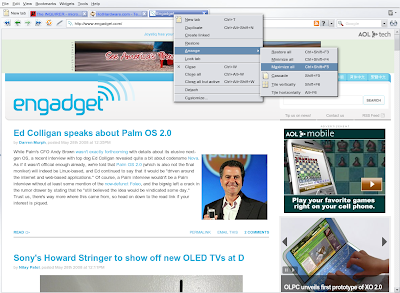
Opera tabs management


Standard toolbar includes six basic buttons used to navigate within a document, address field, the search field for quick searching on the Web and the «View» button to toggle the view bar.
The search bar offers you several search engines to choose from. You also can add your favorite search engines to the search bar.

Opera search bar


The view bar allows you to find a specified word in the active Web page, and provides you quick access to voice management (if available) and features that affect the display of the page, such as shortcuts to turn off stylesheets and images, zoom and so on.
Zooming in Opera applies to the entire page at once, instead of just the text. I found this very useful.

Opera view bar


Another great feature of Opera is the sidebar which is placed on the left of the screen space. You can toggle it by pressing F4 key or clicking on the left side of the Opera window.
This sidebar gives you quick access to different panels such as bookmarks, widgets, history, notes, transfers, links and some others. These panels make the work with Opera even easier. You can configure sidebar by adding and removing panels of your own.

Sidebar of Opera


Opera has highly customizable interface that allows you to personalize it by using beautiful skins, removing and adding panels and buttons.

Customizing Opera. Skins


Opera is designed to be the fastest, smallest, and most full-featured browser available. It is really very fast in loading pages. It is definitely faster than Internet Explorer and smaller than Firefox.
The advanced fraud protection of Opera and its anti-phishing detection keeps your browsing safe and secure.
The very interesting feature of Opera is mouse gestures that allow you to do frequently performed browse operations with small, quick mouse movements.

Mouse gestures settings in Opera


Speed Dial is the new and unique feature of Opera that assigns bookmarks and tabs any digit from one through nine. When you enter one of those numbers into the URL bar, the corresponding site loads when you hit enter.

SpeedDial feature of Opera


Opera includes support for BitTorrent so you don't need to download and install a separate BitTorrent program to download large files. Just click on torrent link and start the download.
There are many others features in Opera such as widgets, notes, Wand utility, simple integration with your favorite e-mail and chat clients, RSS feed reader and sessions management. The Opera browser supports many languages and operating systems.
Overall, I think Opera is one of the best browsers for power users who keep many pages open at once and perform frequent downloads. I like it.
You can download the latest version of Opera here.

Web Based File Managers for Amazon S3

0 Conmment

There are quite a few good desktop clients for Amazon S3 that make managing your S3 account almost as simple as using Windows Explorer. Like with any other desktop software, the downside is that these S3 clients require installation, they are often platform specific and won’t work on mobile phones.

Web Clients for your Amazon S3 Account

If you need quick access to your Amazon S3 files on the go or are looking to upload documents and other files to Amazon S3 from a computer that doesn’t have any S3 client installed, you can consider going for a web based file manager. Here are some good choices:

S3fm.com - This is an AJAX based online file manager for Amazon S3 that can be used from any JavaScript enabled web browser on any platform.

With S3fm, you can browse existing files inside S3 buckets through a convenient dual-pane interface or click the upload button to transfer multiple file from the local hard disk to your S3 cloud in one go. It is integrated with Scribd so you can easily preview documents hosted on S3 in the browser itself without having to download them first.

s3 web client

Like your regular Windows Explorer, you can just right click any file (object) in S3fm to view and edit properties of that file. You can change file access permissions (ACL), set the Expires header (so that the download link expires after a set time) or grab the full public URL to share that file on the web.

The S3fm service doesn’t require registration and your Amazon S3 login credentials get stored in the browser itself (via a cookie).

Baconfile - If you use Amazon S3 to upload public files (like documents, videos, PDFs, etc.) that anyone can download with a direct link, you should try Baconfile.

web upload for amazon s3

It’s a simple service where you can upload files from any web browser and they’ll land straight into one of your S3 buckets. The difference is that your uploaded files will instantly become public so just about anyone can download them from the web.

The Baconfile service may therefore be very useful for bloggers, twitter users and even podcasters - you can upload the media file to your S3 account via Baconfile and then add the direct link to that file in your blog post. And it’s a great alternative from uploading files to S3 from a mobile phone browser.

Here are some more tips for Amazon S3 users:

Create a Virtual Business Card with all your Social Profiles

0 Conmment

You have profiles on almost every social networking website from Facebook to Flickr to LinkedIn. The next part is how do you create a single web page (let’s call it your virtual business card) that will help people easily explore your various online social identities and also connect with you on common networks where they too may have a presence.

Display all your Online Social Profiles on one Web page

If you have already have a blog, creating a virtual business card is almost as easy as dragging some icons in your sidebar and linking them to your respective social profiles. But for people who don’t have websites or need an all-one-page to showcase their social profiles without any clutter, here are some web services that might come really handy.

chimp personal domain

Chi.mp - You normally have to pay around $10 per year to buy a domain name on the Internet but with chi.mp, you get a free domain name (like amitagarwal.mp) to display all your social profiles and other online activities in one place.

Chi.mp will be the owner of you reserved domain though you can buy it from them anytime for a fee of course. Your chi.mp URL is OpenID enabled so you can use it to log into other websites like Yahoo! or Google Friend Connect.

onepage profile

OnePage - You may use this service for creating your virtual business card as well as for sharing your lifestream or what you do online - see example.

The interface of OnePage is pretty awesome but they are yet to add support for Facebook and some popular IM services. The service is in closed beta but you may use the code "labnol" to get yourself an account.

friendfeed badge

FriendFeed Badge - FriendFeed offers an extremely customizable widget that can have any width and you can completely remove all the branding from the profile badge before embedding.

If you know a bit of CSS, you can hack this badge to make it look the way you want.

embed profile cards

Retaggr - If you are looking to embed your social business card in your website or your email signature, Retaggr is probably a good choice.

With Retaggr, you can import profiles from almost any social networking site on the web and share them either as an index card or as a life stream. There’s a email option in the profile card as well so other may reach you without you having to reveal your email address.

MyBlogLog is another good service that offers these "about me" widgets both in JavaScript and plain HTML for use in Outlook emails and social profiles.

cardly business card

Card.ly - The services that we discussed so far are actually life-streaming applications that also offer a way to share your social profiles from one place. Card.ly is different.

It’s purely for creating "virtual business cards" that now only look attractive (see example) but you can also embed them in web pages. Go for the premium version to remove all the branding or for hosting the card on your own domain.

google profile

Google Profiles - Grab a vanity URL for your Google Profile if you haven’t done so already and what you get is a personal portal that has your recent photos plus links to your blog and other social profiles.

You should also enable the ‘Send a message’ option so that anyone with a Google Account can email you without knowing your email address - see example.

Create a Google Profile Badge

Here’s an undocumented trick that will help you create an embeddable badge for your Google Profile very similar to FriendFeed.

Log into your Google Reader account and view the HTML source code of that page. You’ll see a JavaScript variable called "USER_PROFILE_ID" - select the value of that variable and copy it to the clipboard. Replace xxx in the following URL with that value.

http://google.com/s2/widgets/ProfileCard?uid=xxx

You can now embed the profile badge in your web pages using the IFRAME tag - see example.

Related: Build a Lifestream with Google Reader

Remotely Control your Mac from Anywhere with a Simple Tweet (or a Text Message)

0 Conmment


remote control your mac

TweetMyPC, a free utility that lets you control a Windows computer from anywhere has just been ported to Mac. The new app is called TweetMyMac and, like its elder Windows cousin, you can use TweetMyMac to send commands to your Macbook over the web from any other computer or even a mobile phone (via a text message).

The Mac-Twitter Workflow

It works like this. You install the app on your Mac and associate it with your Twitter account*. Now you can send a regular tweet with the command wrapped in (for example, shutdown or sleep). The utility running on the Mac will check for your tweets at frequent intervals and will perform the required action on the remote Mac computer as soon as it finds some command in the twitter stream.

*It is recommended that you create a separate Twitter id (with “protected” updates) for sending remote commands to your Mac.

Send Remote Commands to your Mac

Here are some useful commands that you may send to your Mac via TweetMyMac:

remote mac commands

1. Shutdown (to shutdown your Mac immediately without saving any files) or Sleep (for putting your Mac in sleep mode).

2. iSight - This is great if you want to know what’s happening in the surroundings. Send the iSight command and the app will take a picture with the built-in iSight web camera and will upload it to Twitpic.

3. Screenshot - If you want to know what applications are open on your Mac desktop, send the “screenshot” command - the picture of your desktop will again be uploaded to twitpic.

The app is in beta (so expect some bugs) and obviously it should always be running on your Mac computer for receiving commands.

Saturday, August 29, 2009

Youtube Downloader HD - Free tool to download HD videos from YouTube

0 Conmment


Youtube Downloader HD is a free tool to download videos from YouTube and save it to your local computer. The videos can be converted to avi video format or to mp4 (compatible with iPod, iPhone).

The main distinguishing feature of Youtube Downloader HD is that now you can download High Quality videos and High Definition videos from YouTube.

FEATURES

1. Easy to use: just copy video URL from your web browser and paste to Youtube Downloader HD.
No need to use scripts or browser plug-ins.
2. Convert downloaded video to various formats.
3. Download Youtube High Definition videos (available on certain videos)
4. Unicode support: Youtube Downloader HD can save movies whose names have non-standard characters (like Chinese, Japanese, Cyrillic, etc.)

VIDEO FORMATS

FlashGet - An award-winning download manager for Windows

0 Conmment


FlashGet is specifically created to address two of the biggest problems when downloading files: Speed and management of downloaded files.

FlashGet Version 3 Beta Usage:
If FlashGet is already installed on your system, back it up by moving all its files to a separate folder and then unzip the downloaded files to your FlashGet installation folder.
If you wish to keep the English language as your default language, DO NOT forget to follow these steps before exiting FlashGet version 3:
· Right-click on the tray icon
· Select Options
· Click the Appearance tab in the Options window
· Click on Language
· Select English
· Click Apply and then OK

If you’ve ever waited forever for your files to download from a slow connection, or been cut off midway through a download - or just can’t keep track of your ever-growing downloads - FlashGet is for you.

FlashGet can split downloaded files into sections, downloading each section simultaneously, for an increase in downloading speed from 100% to 500%. This, coupled with FlashGet’s powerful and easy-to-use management features, helps you take control of your downloads like never before.

NOTE Now Flashget is FREEWARE !

Here are some key features of “FlashGet”:

· Optimize the system resource
FlashGet can use up the lowest system resources and will not influence your normal work or study.

· Call anti-virus automatically
FlashGet can call anti-virus automatically to clean viruses, spyware and adware after finishing download.

· Increase the download speed and stability
Flashget can increase download speed from 6-10 times. It uses MHT (Multi-server Hyper-threading Transportation) technique and optimization arithmetic

· Support HTTP, FTP, BT and other various protocols
FlashGet supports HTTP, FTP, BT, MMS, RTSP and other protocols. It is seamless between protocols and there is no need to operate manually for download switch. The One Touch technique optimizes BT download and can automatically download target files after getting seeds information, hence no need to operate again.

· Powerful files management feature
It supports unlimited categories. Each category is assigned a download saving directory. The powerful management feature can support drag and drop, adding and description, search, rename, etc.

Yahoo! Widget Engine - run Widgets on your desktop

0 Conmment


The Yahoo! Widget Engine (formerly known as Konfabulator) is a JavaScript runtime engine for Windows and Mac OS X that lets you run little files called Widgets that can do pretty much whatever you want them to.

Using Yahoo! Widget Engine you will be able run widgets that can be alarm clocks, calculators, will fetch the latest stock quotes for your preferred symbols, can tell you your WiFi signal strength and even give your current local weather.

What sets Yahoo! Widget Engine apart from other scripting applications is that it takes full advantage of today’s advanced graphics. This allows Widgets to blend fluidly into your desktop without the constraints of traditional window borders. Toss in some sliding and fading, and these little guys are right at home in Windows XP and Mac OS X.

The format for these Widgets is completely open and easy to learn so creating your own Widgets is an extremely easy task.

For the “skinning” crowd, Yahoo! Widget Engine is a dream come true. You can easily change the look, feel, layout, even functionality of a Widget so that it matches your lifestyle, your desktop, or the pants or skirt you have on that day.

Requirements:

· A connection to the Internet.
· 512 megabytes of RAM is recommended.

Reasons why this program is marked as adware:

· Yahoo! Widget Engine tries to change your homepage and default search engine. You can, however, uncheck these options.

Firefox web browser : faster, more secure ...

0 Conmment


Homepage

Firefox Awards

* .Net Award for Open Source Application of the Year, December 2007
* PC Pro "Software of the Year" Award 2007, December 2007
* CNET Editors' Choice, October 2006
* Digital Lifestyle award, Berlin, September 2006
* PC World's 100 Best Products of 2006, July 2006
* Lutèce d'or for best OpenSource project, Paris, June 2006
* PC Pro Real World Award, London, December 2005
* UK Usability Professionals' Association Award Best Software Application 2005, November 2005
* PC World Product of the Year, June 2005
* Forbes Best of the Web, May 2005
* Titan of the Year for best Open Source project, PC-Welt Editorial Staff Award 2005
* Best Internet Tool, PC-Welt Readers Choice Award 2005

Google Chrome - Google’s web browser

0 Conmment


Google Chrome 3:

Free Download - Click here to download and donate $0.001 for the website

Google Chrome 2:

Free Download (Installer version) - Click here to download and donate $0.001 for the website

Free Download (Portable version) - Click here to download and donate $0.001 for the website

Google Chrome is a browser that combines a minimal design with sophisticated technology to make the web faster, safer, and easier.

One box for everything
Type in the address bar and get suggestions for both search and web pages.

Thumbnails of your top sites
Access your favorite pages instantly with lightning speed from any new tab.

Shortcuts for your apps
Get desktop shortcuts to launch your favorite web applications easily and quickly.

Here are some key features of “Google Chrome”:

· One box for everything
· New Tab page
· Application shortcuts
· Dynamic tabs
· Crash control
· Incognito mode
· Safe browsing
· Instant bookmarks
· Importing settings
· Simpler downloads


Download Firefox web browser : faster, more secure ...

Internet Download Manager

0 Conmment


Internet Download Manager (IDM) is a tool to increase download speeds by up to 5 times, resume and schedule downloads. Comprehensive error recovery and resume capability will restart broken or interrupted downloads due to lost connections, network problems, computer shutdowns, or unexpected power outages. Simple graphic user interface makes IDM user friendly and easy to use.Internet Download Manager has a smart download logic accelerator that features intelligent dynamic file segmentation and safe multipart downloading technology to accelerate your downloads. Unlike other download managers and accelerators Internet Download Manager segments downloaded files dynamically during download process and reuses available connections without additional connect and login stages to achieve best acceleration performance.


Internet Download Manager supports proxy servers, ftp and http protocols, firewalls, redirects, cookies, authorization, MP3 audio and MPEG video content processing. IDM integrates seamlessly into Microsoft Internet Explorer, Netscape, MSN Explorer, AOL, Opera, Mozilla, Mozilla Firefox, Mozilla Firebird, Avant Browser, MyIE2, and all other popular browsers to automatically handle your downloads. You can also drag and drop files, or use Internet Download Manager from command line. Internet Download Manager can dial your modem at the set time, download the files you want, then hang up or even shut down your computer when it's done.

Other features include multilingual support, zip preview, download categories, scheduler pro, sounds on different events, HTTPS support, queue processor, html help and tutorial, enhanced virus protection on download completion, progressive downloading with quotas (useful for connections that use some kind of fair access policy or FAP like Direcway, Direct PC, Hughes, etc.), built-in download accelerator, and many others.

Version 5.17 adds IDM download panel for web-players that can be used to download flash videos from sites like YouTube, MySpaceTV, and Google Videos. It also features complete Vista support, YouTube grabber, redeveloped scheduler, and MMS protocol support. The new version also adds improved integration for IE and IE based browsers, redesigned and enhanced download engine, the unique advanced integration into all latest browsers, improved toolbar, and a wealth of other improvements and new features.

Download Internet Download Manager Now


Mirro:

Download Internet Download Manager v5.16 from CNet Download.com

Download Internet Download Manager v5.17 from a mirror site

You may download 30-day trial version

Trend Micro Internet Security Pro 17.10

0 Conmment
Trend Micro Internet Security 2009 software is award-winning international security - virus is rated 5 stars and a personal firewall to prevent the dangerous elements such as viruses, worms, Trojans, and hackers.

When activated manually scan mode, although scan mode button gray but not the scan not occur as expected. Restart the program still appears the same problem. Even when switching to another user account and uninstall the program, the software still thinks the program window has been opened in somewhere (actually not open), and the result is not allow the uninstall to continue until the user logs off and back.

The weak interface is similar to the ability to detect malware software. Results showed that Trend Micro detects only 90% of malware samples AV
-Test.org, ranked fifth in the number of applications testing. Ability to detect spyware and adware is also very poor - 84%, and the results were similar heuristic.

The experiment was conducted on the basis of use a month old virus definitions to measure the ability to detect known malware program application. Trend Micro is only detected 13% of other malware is not aware of this.

Meanwhile, Trend Micro to work quite well with the ability to destroy malware - 70% delete files and change Registry settings on the malware. This capability packages only just behind Norton Internet Security 2008 (80%). Simultaneously scanning speed 732MB of files the fastest of the eight applications testing.

In general, Trend Micro has quite a lot of features you expect from a package of security applications, such as antispam and control children, anti-phishing, anti-virus, anti-spyware and firewall. Firewall features of the application works quite well, it does not show a lot of unnecessary warnings while the program is to prevent unintended access to the Internet.

Advertisement


Copyright 2008 All Rights Reserved Revolution Two Church theme by Brian Gardner Converted into Blogger Template by Bloganol dot com